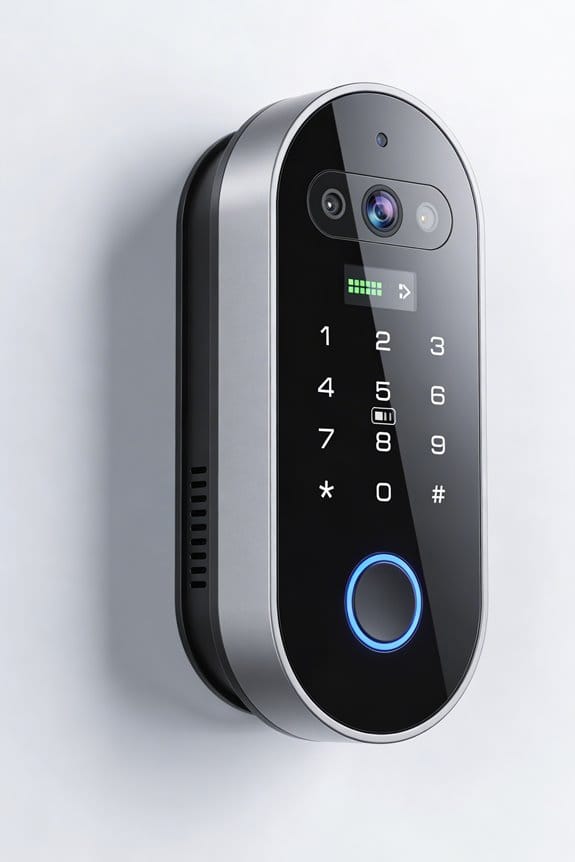
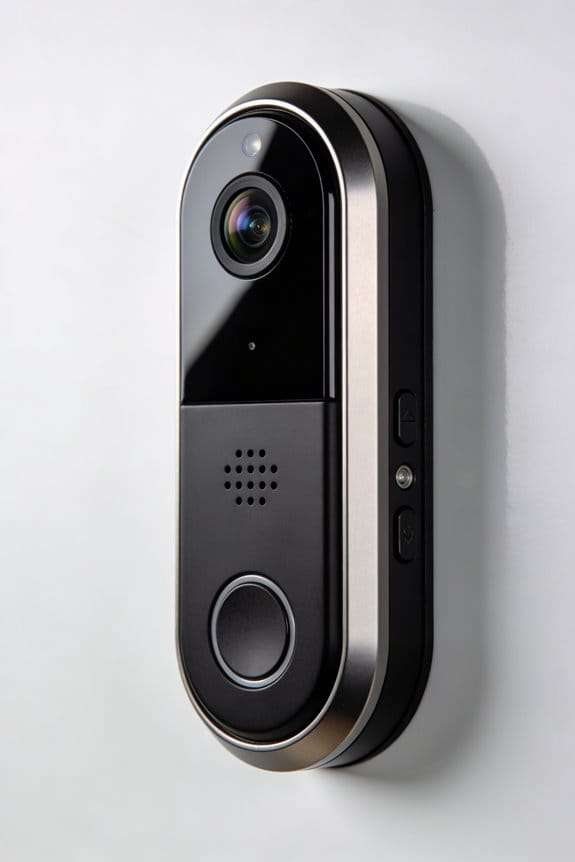

We’ve explored the technology behind video doorbells, which enhance home security and convenience. These devices typically feature 1080p HD video, two-way audio, and noise cancellation for clear communication. They rely on robust Wi-Fi connections for live streaming and timely alerts. Advanced motion detection reduces false alarms, while storage options include cloud and local systems. We’ve identified that understanding these features is essential for effective use and integration with smart devices. From here, we can uncover additional insights.
Key Takeaways
- Video doorbells typically feature high-definition cameras (1080p HD or better) for clear video capture and real-time viewing.
- They employ infrared night vision technology for clear surveillance during low-light conditions.
- Two-way audio systems with noise-cancellation enhance communication between users and visitors.
- Advanced AI and motion detection capabilities reduce false alerts by differentiating between people and other movements.
- Seamless connectivity via dual-band Wi-Fi ensures reliable video streaming and alert notifications to mobile devices.
How to Choose and Install a Video Doorbell: A Step-by-Step Guide
When it comes to boosting your home security with a video doorbell, choosing the right one can feel overwhelming. Have you ever stood at your door and wished you could see who’s there, even when you’re not home? That’s where a quality video doorbell comes in.
Start by looking for a model that offers at least 1080p HD resolution. You want clear video quality—after all, what’s the point if you can’t see who’s at the door? Two-way audio is also essential; it lets you chat with visitors without having to open the door. Plus, make sure it’s compatible with both the 2.4 GHz and 5 GHz bands of your Wi-Fi. Nothing’s worse than a doorbell that doesn’t connect!
Now, let’s talk installation. The spot you choose is key; ideally, position the camera about four feet off the ground for a good view. Pay close attention to the installation guide when it comes time to set it up. Follow the steps to connect to your Wi-Fi network through the app. And don’t forget to double-check everything once it’s up.
Truth is, keeping up with maintenance is just as important as the initial installation. Regularly check the battery life and look out for firmware updates. They can help keep your doorbell running smoothly and make sure it’s secure. Also, consider the importance of AI-powered detection to reduce false alerts and improve security monitoring.
Here are a couple of handy tips:
- Give the lens a quick wipe now and then for the best video clarity.
- Set a reminder to check for firmware updates to stay on top of security improvements.
In the end, picking the right video doorbell is about combining quality features with proper placement and maintenance. Are you ready to take your home security up a notch?
What Is a Video Doorbell and How Does It Work?
Have you ever worried about who’s knocking at your door when you’re not home? A video doorbell might be just what you need to help keep an eye on things. This nifty device combines a classic doorbell with modern tech, adding an extra layer of security to your home. With a high-definition camera that uses motion detection, you’ll be able to see visitors in real-time right from your smartphone.
So, what can a video doorbell actually do for you? Here are some key features to consider:
- Live Video Streaming: You get to monitor all activity around your door, making it easier to keep tabs on your front yard.
- Two-Way Audio: This lets you chat with whoever’s at the door, even if you’re not there. Super handy, right?
- Wi-Fi Connection: It connects to your home network, so you can integrate it with your other smart devices.
- Cloud Storage: You can store video footage safely for review later, which is great if you need to check back on something.
Many leading models in 2025 also include advanced AI detection that helps minimize false alerts by distinguishing between people and other types of movement.
Truth is, having a video doorbell can really boost your home’s security while giving you some peace of mind. It’s like having a friend keeping watch at your door. Have you thought about how it could change the way you deal with deliveries or unexpected visitors?
To wrap it up, a video doorbell makes monitoring your home easier and more efficient. It’s worth considering whether this tech could fit into your life. What features do you think would be most useful for you?
How Camera Modules Work in Video Doorbells

Have you ever wondered how clear your front door footage really is? Camera modules in video doorbells play a huge role in that clarity. Most of these cameras can capture high-definition images at 1080p HD or even higher, so you can expect crisp and detailed video footage. With a field of view around 120 degrees, they cover your doorstep and the surrounding area pretty thoroughly.
And let’s not forget about low-light situations. A lot of models now come with infrared night vision, which means you’ll still get clear footage in the dark. Additionally, with motion detection, you’ll be alerted whenever there’s movement near your door, and the camera will record that activity. This feature alone can seriously step up your home security.
But the benefits don’t stop there. Many of these camera modules work seamlessly with microphones and speakers. This means you can chat with visitors right from your phone, whether you’re inside or even miles away. It’s like having a little intercom system right at your doorstep.
Recent models also reduce false alarms significantly by using AI motion detection technology, which improves the accuracy of alerts and enhances overall security.
So, why does this matter? Well, by choosing a video doorbell with these features, you’re not just enhancing security; you’re also improving the overall experience when it comes to managing visitors or deliveries.
In short, these camera modules are really worth considering for their clarity, night vision, and two-way communication. What features do you think would make a difference for you?
Key Features to Look for in Video Doorbells
When it comes to security, a video doorbell can really make a difference in how you monitor your home. Have you ever felt uneasy about who’s at your door? Choosing the right video doorbell can ease some of that concern. You’ll want to look for a model that offers at least 1080p HD resolution and a decent 120-degree field of view. That way, you can capture clear video of visitors. Don’t forget about night vision, either—it’s essential for keeping an eye on things in low light!
Two-way audio is a nifty feature, letting you chat with visitors without even opening the door. How convenient is that? Plus, smart features like motion detection and artificial intelligence can help filter out those pesky irrelevant alerts, so you’ll only get notifications when it really matters.
Here’s what to keep in mind when shopping for one:
- Pick a doorbell with HD video for clarity.
- Make sure it has night vision for those evening visitors.
- Look for two-way audio to communicate easily.
Many video doorbells, like the Blink Video Doorbell with Sync Module 2, also offer seamless Alexa integration for easier control and interaction.
At the end of the day, finding the right video doorbell can significantly enhance your home security. So, what’s the most important feature for you?
What Role Does Wi-Fi Play in Video Doorbell Functionality?
Ever had that moment when you’re at work and suddenly wonder who’s at your door? That’s where a video doorbell can really shine, but Wi-Fi is what makes it all tick. It’s the lifeline connecting your doorbell to your home network, which means you can stream live video right to your phone. Most of these gadgets run on a 2.4 GHz network, but newer ones can tap into both 2.4 GHz and 5 GHz bands for speedier data flow.
Now, think about notifications. A solid Wi-Fi connection is key here. You want to get those alerts on your phone without any delays—whether it’s someone ringing the bell or just some movement at your door. If you’re dealing with a weak signal, you might miss important moments. So, if you have an obstacle like a big tree or thick wall between your doorbell and router, that can be a real issue.
Some doorbells even offer cloud storage for video recordings. I mean, how handy is that? You could check in on what’s happening even if your internet goes down. By the way, if you’re trying to get everything set up, make sure you check the strength of your Wi-Fi signal for peak performance. Many advanced home security systems also support dual-network technology, combining Wi-Fi and GSM cellular backup for real-time alerts even during Wi-Fi outages.
How Motion Detection Enhances Home Security
When you’re thinking about home security, have you considered how motion detection tech in video doorbells can really make a difference? With these smart doorbells, you’ll get alerts the moment someone—or something—moves near your front door. What’s great about this technology is that it uses smart algorithms to tell the difference between people and stuff that’s not a threat, so you won’t be bombarded with unnecessary notifications.
You can even customize the motion zones. This means you can focus on the areas where someone might try to sneak in. Also, cloud storage comes in handy, so you can save those videos and have solid proof in case something happens, like theft or vandalism. Honestly, homes with motion detection see a big drop in package theft and break-ins, so having these features is pretty crucial for anyone today.
The best part is: you can fine-tune your settings. Try this: set your motion zones to only cover your front porch and driveway. This will help cut down on alerts caused by passing cars or wandering pets.
Additionally, using AI-powered detection can significantly reduce false alerts and make your home security system more reliable.
In short, motion detection in video doorbells enhances your home security significantly. So, what are you waiting for? It’s time to protect what matters most!
The Importance of Two-Way Audio in Video Doorbells
What do you do when a stranger comes knocking at your door? If you’re anything like me, you probably feel a mix of curiosity and caution. That’s where video doorbells come in. They give us a visual connection with visitors, but let’s talk about one of the coolest features: two-way audio. Honestly, it’s been a huge help for security and convenience around my home.
With two-way audio, you can chat with whoever’s at your door thanks to the built-in microphone and speakers. Imagine this: you’re in the middle of a movie, and a delivery person shows up. Instead of getting up to answer the door, you can just give them instructions or even tell unexpected guests you’re not home, right from your couch.
The best part is that many models come with noise-cancellation technology, so even if you live on a busy street, you’ll still hear crystal-clear audio. So, why does this matter? It can serve as a deterrent to intruders. If someone suspicious is lurking, having the ability to confront them from a distance can make a big difference. It’s a small feature that can boost your sense of security and encourage timely reports of any suspicious activity. Two-way audio is also often included in sophisticated systems with motion detection to trigger alerts when someone approaches your door.
Storage Options for Your Video Doorbell Footage
When it comes to selecting a video doorbell, one of the trickiest parts can be figuring out how you’ll store all that footage. You’ve got two main choices: local storage and cloud storage.
Local storage is pretty straightforward. It uses a micro-SD card to keep your recorded footage, meaning you don’t have to pay ongoing subscription fees. Sounds great, right? But don’t forget—this option does require you to check in on it regularly to avoid running out of space.
On the flip side, cloud storage is all about convenience. Your footage gets saved on online servers, which makes it super easy to access from anywhere and keeps your recordings backed up automatically. The downside? You’ll likely end up with monthly fees, especially if you need more storage.
Honestly, some video doorbell models offer the best of both worlds with dual storage options. This way, if one method fails, you’ve got a backup. So, why is this important? It guarantees that your video doorbell keeps capturing and storing essential footage without a hitch.
Ultimately, weighing these options is crucial. Whether you prefer local storage, cloud storage, or both, being clear on how you’ll handle your footage can make a big difference in how secure and manageable your video doorbell experience is. Have you thought about which option fits your lifestyle best? It’s also important to consider systems with sufficient storage capacity to ensure your recordings are preserved reliably over time.
Using Your Video Doorbell With Smart Devices
Integrating a video doorbell with your smart devices can really boost your home’s security and convenience—but how does it all work? These devices are designed to smoothly interact with your other smart home gadgets, allowing you to control them easily with voice commands through Alexa or Google Assistant. Imagine just saying, “Turn on the lights,” and watching them light up when someone approaches your door.
One fantastic feature is motion detection. You can set up routines that will automatically turn on outdoor lights or send you alerts whenever there’s activity at your doorstep. Plus, there’s the added peace of mind knowing that you can chat with visitors without even opening the door, thanks to the mobile app that connects over Wi-Fi. And if you’re worried about storing footage, these doorbells often support both cloud and local storage, so you won’t miss anything.
Here’s the trick: Before you buy a video doorbell, always check that it’s compatible with your existing smart home systems. Installation might seem daunting, but getting a professional to set it up can ensure that everything works together flawlessly.
Honestly, having these devices makes daily life just a little bit easier and safer. Many models now include AI motion detection that reduces false alerts by distinguishing between humans, pets, and objects.
So, is it time to upgrade your home security?
Frequently Asked Questions
Is There a Monthly Fee for the Ring Doorbell?
Yes, there’s no mandatory monthly fee for the Ring doorbell. However, to access advanced Ring features like enhanced camera quality, motion detection, and smart home integration, we might consider subscription plans for better support and privacy.
Why Are People Getting Rid of Ring Doorbells?
We’re getting rid of Ring doorbells due to privacy concerns, data security issues, high subscription costs, questionable product reliability, poor customer service, installation challenges, and a lack of compatibility with other smart devices, which undermines brand trust.
Does Ring Work Without Internet?
We love a good joke, but alas, Ring won’t work without internet! For offline functionality, explore local storage solutions, check battery life, and consider non-smart setups. Connectivity troubleshooting steps are crucial for success!
Do You Have to Pay Monthly for a Video Doorbell?
Yes, we typically need to pay monthly for video security through subscription plans, especially for cloud services offering extended data storage. However, some models offer local storage, potentially easing installation costs and user reviews on privacy concerns.